

The first big update within the iOS 26 cycle has just arrived. It is called iOS 26.1 and, although its main function is the same as always (fix errors and offer us more stable performance), this time Apple has taken the opportunity to introduce changes that go further.
Some interesting, others controversial. We talked about that selector to choose the transparency of Liquid Glassgoing through a change in the alarms that tries to prevent us from falling asleep, in addition to other small improvements that you can enjoy right now by downloading iOS 26.1 on your iPhone.
In addition, this update comes hand in hand with the rest of Apple’s operating systems. Therefore, if you have more devices, you can also update to macOS 26.1, iPadOS 26.1, watchOS 26.1, tvOS 26.1 and visionOS 26.1.
The missing performance arrives with iOS 26.1
iOS 26 came with everything: a new design, major interface changes, Liquid Glass everywhere. But with that magnitude of changes also came the small details that occur in any large update: the system asked for time to settle. Small jerks here, slightly higher battery consumption there. Nothing out of the ordinary, but annoying if you are one of those who notice these things.
iOS 26.1 changes the equation. The improvement in performance is not a sensation. The animations are more fluid, those occasional jerks of the apps have disappeared, the keyboard responds naturally. AND The numbers confirm it: in our tests with Geekbench 6 There is a performance jump with higher scores. The battery also returns to normal, recovering that predictable consumption that we had before.
|
iOS 26.0.1 |
iOS 26.1 |
|
|---|---|---|
|
iPhone 17 Pro Max |
Multi core CPU: 9,454 points |
Multi core CPU: 9,872 points |
|
iPhone 15 |
Multi core CPU: 6,575 points |
Multi core CPU: 6,760 points |
Liquid Glass: now with iOS 26.1 you choose
It was the big surprise of the summer. The new design of iOS 26, with its transparencies and that Liquid Glass effect, captivated many, but not all. The controversy grew: some loved it, others wanted more contrast, more visual solidity. Apple knew and, this time, listened.
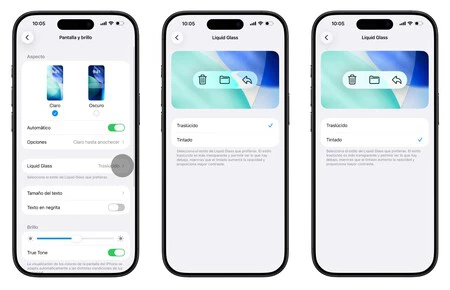
Now you have control. Go to Settings > Display and brightness > Liquid Glassand you will find two options: Transparent mode or Tinted mode, which increases opacity and gives more prominence to the contents.
Goodbye to accidental pocket photos
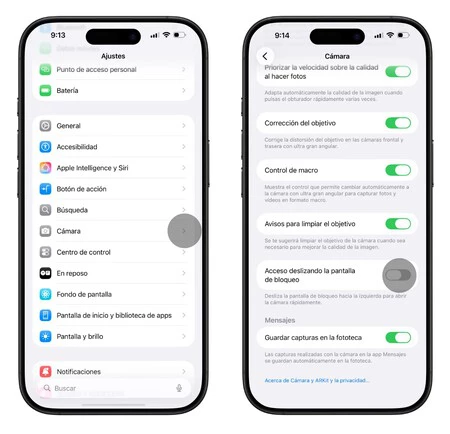
How many times has it happened: you take your iPhone out of your pocket and the camera is already open. That’s when you discover a series of accidental photos in your camera roll. iOS 26.1 solves it easily. Go to Settings > Camera, scroll down to the bottom and you will find a new option: “Lock screen swipe access.”
Turn it off if you want to prevent swiping from the home screen from opening the camera. You will still be able to open it from camera control or from the icon on the lock screen, but the swipe gesture disappears.
Anti-snooze alarms
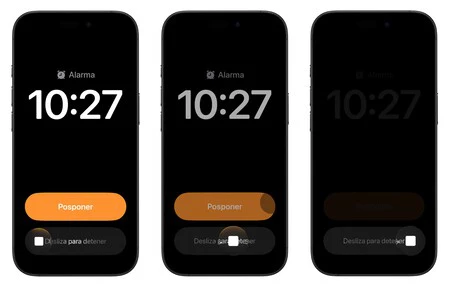
If you are one of those who fall asleep by pressing the stop alarm button by mistake, iOS 26.1 is designed for you. con iOS 26, the stop and snooze buttons are the same size. The result: too easy to turn off the alarm half asleep without realizing it.
Now Apple has changed this. To stop an alarm or timer, you have to swipe. It’s a conscious movement, like answering a call. You can’t turn it off by accident. If you prefer to go back to the previous version (because not all of us wake up fighting our iPhone), you can do it. Go to Settings > Accessibility > Touch and turn on “Prefer one-touch actions.” This way you can press directly again.
Smaller changes also coming to iOS 26.1
Apple Music now lets Swipe on the cover to change the songn. It’s fast, natural and much better than searching for buttons.
The Apple TV icon changes and is now more colorful. Prepares for the name change that will arrive in December, leaving behind the “1+” of Apple TV+ to be only Apple TV.
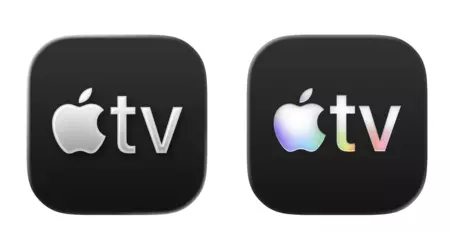
Old and new TV app icon
In the Fitness app on your iPhone you can now create custom workouts. You don’t need an Apple Watch if you have AirPods Pro 3, because these have a heart rate sensor. Choose the type, estimated calories, effort level, duration. Your training, your form.
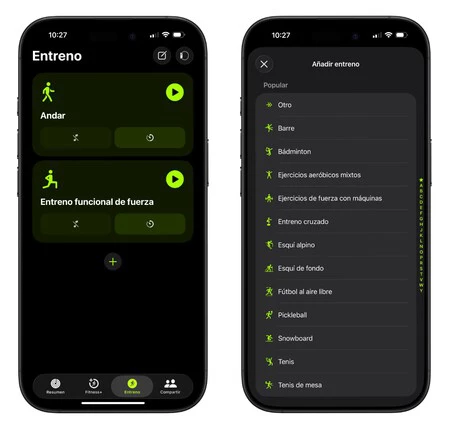
Apple Intelligence also continues to expand: Danish, Dutch, Portuguese, Turkish. The gap is closing so that more users can access these features.
Bonus: Slide Over returns to iPad
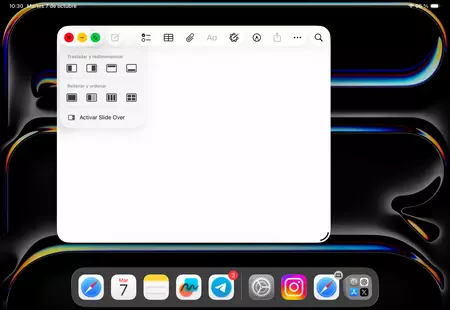
In iPadOS 26, Apple removed Slide Over when it introduced the new window system. Many of us miss that little floating window moving across the screen. Apple has quickly rectified and, with iOS 26.1, it has returned. You will find Slide Over by pressing the green full screen button for a couple of seconds.
Is iOS 26.1 worth installing? Without hesitation. If you are already on iOS 26, you will notice a faster system. If you haven’t yet jumped from iOS 18 for fear of teething problems, now is your time. Installing iOS 26.1 directly is the best decision, because you will find yourself with the first really round version of the new system. There is no risk: it is stable, fast and ready.
In Applesfera | Apple TV and its releases: the upcoming series, movies and documentaries that we will see in its catalog
In Applesfera | New iOS 27 – everything we think we know about the future operating system for the iPhone

