

The last big update of the year is here. It’s called iOS 26.2 and it arrives just in time to close 2025 with the iPhone ready. After a beta cycle that has allowed us to test very interesting new features, Apple is finally releasing the final version for everyone.
Although its underlying mission is to improve stability Looking ahead to the new year, Apple has taken the opportunity to bring us functions that change the way we use native apps such as Reminders or the lock screen. And yes, you can now download it on your iPhone.
As usual, she does not arrive alone. If you have more devices in the ecosystem, get ready for an afternoon of updatesbecause we also have iPadOS 26.2, macOS 26.2, watchOS 26.2 and tvOS 26.2 available.
Reminders finally ring like an alarm clock
It was one of those historical shortcomings: until now, if you set a date and time to a reminder, the iPhone notified you with a standard notification. If you didn’t look at the iPhone, you missed it. With iOS 26.2 that’s over.
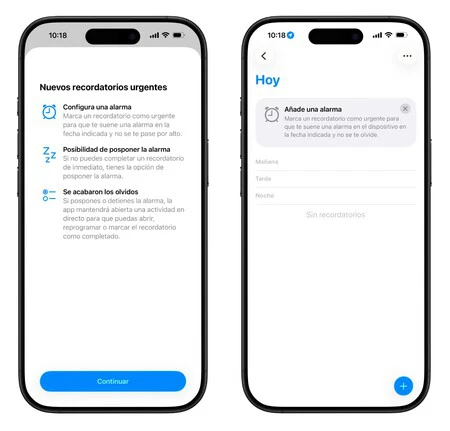
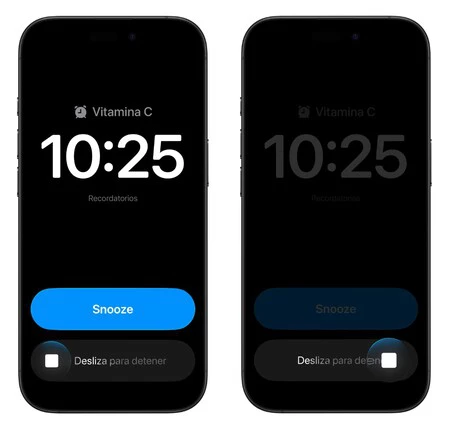
Now, when you create a task, you’ll see a new option to mark it as “Urgent.” When you do this, your iPhone will not simply emit a “ding”, but instead an alarm identical to that of the alarm clock will sound. It is ideal for things that you cannot ignore, such as taking medication or removing something from the oven, since it is also capable of skipping Concentration Modes.
Liquid Glass in more places and full control on the lock screen
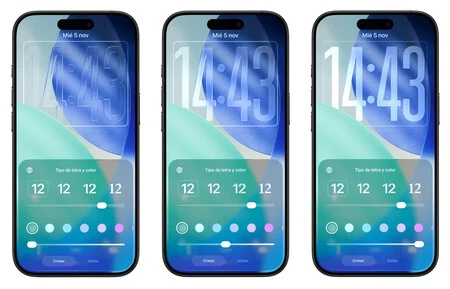
If with iOS 26.1 we saw the arrival of a Liquid Glass selector for the entire system, in iOS 26.2 Apple refines the shot so that the lock screen is the way you want. If you are going to customize your background, you will see that you now have a dimmer for the watch’s Liquid Glass effect.
It’s no longer just choosing between “transparent” or “tinted.” Now you can adjust the exact degree of transparency so that elements like the time are read perfectly, regardless of the background you use.
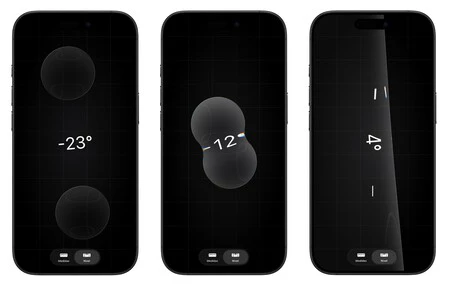
Additionally, this design language has a cameo in the Measurements app– If you open the level, you will see that the white balls have been replaced by bubbles with a Liquid Glass effect.
Your AirPods now translate in real time
It took a while, but the wait is over. With iOS 26.2, real-time translation lands on AirPods within the European Union. If you have AirPods Pro 2, AirPods Pro 3, or AirPods 4 and an iPhone with Apple Intelligence, you can have a conversation with someone in another language and hear the translation directly in your earwhile the other person listens to yours through the iPhone speaker.
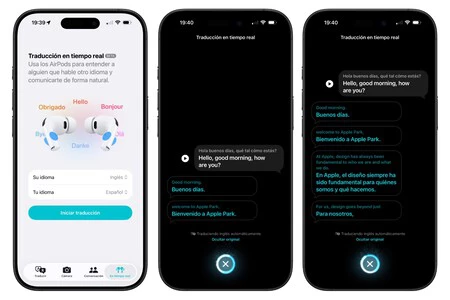
To activate real-time translation, you will only have to go to the Translation app and select the “Real Time” tab when you have the AirPods in your ears. We at Applesfera have tried it while traveling to Vienna and we ended the vacation very satisfied.
More news coming to iOS 26.2
- Single-use codes in AirDrop– You can now generate a temporary code to share files with someone who is not in your calendar. The permit expires after 30 days.
- AI on Apple Podcasts: The native app is now capable of automatically generating chapters in episodes and detecting mentions of other programs to create direct links.
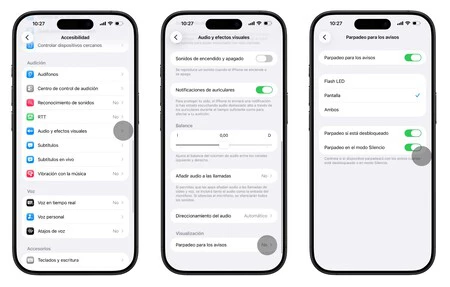
- The screen as a notification flash– From Accessibility, you can have the screen flash white when you receive a notification, as an alternative to the rear LED flash.
- The Games app sorts by size: The library can now be sorted from most to least heavy, a good indication of what to uninstall when you need to free up space.
- Cleaner CarPlay– Added an option to hide pinned contacts in CarPlay Messages if you prefer a less busy view.
- Offline lyrics on Apple Music: You no longer need a connection to see the lyrics of the songs you have downloaded in your library.
- Your sleep score changes: Apple has recalibrated the algorithm to be more realistic. The “Excellent” category disappears and the numbers now better reflect how you really feel when you wake up.
- Tables in Freeform: The Apple app launches tables, a highly requested function that allows you to organize information in a much more structured way.
- Smoother menu animations: The pop-up menus that are displayed from the corners now have a faster animation and with a small “bounce”, a detail that adds fluidity to the system.
We are facing the version that closes the year, which means that it is the most stable and polished of all of 2025. If in the first versions of iOS 26 you noticed some battery drain or strange behavior, iOS 26.2 is the version that comes to leave everything “fine” for the holidays.
In Applesfera | New iPhone 18 – Everything we think we know about them
In Applesfera | New iOS 27 – everything we think we know about the future operating system for the iPhone

