


If I had managed to set up my own Google Photos in the cloud taking advantage of the web hosting plan that I have contracted, why not create a Spotify? I’m in a debate with myself about maintaining subscriptions. Since I believe in being as self-sufficient as possible, I got to work.
My hosting has unlimited storage, this already looked good. I looked for open source tools and opted for one NextCloud automatic installation under my domain. I activated one of the Music plugins that are available for said NextCloud and then managed the Subsonic protocol to access the server from my mobile using an app. The result: Spotiván.
Tidying up my music library
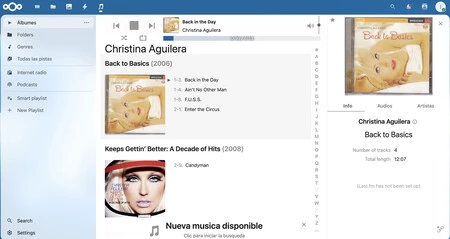
The music library uploaded to NextCloud. Screenshot of desktop web browser
I have a Spotify subscription that has not been continuous. I currently pay for it, along with YouTube Premium; which, in turn, also gives me YouTube Music. I have a huge catalog of music at my fingertips and I only listen to my favorite playlist. With records that I already have purchased. Not only does it seem absurd, it is.

The cloud platform was ready, all that was left was to upload the music. NextCloud allows you to save all your files to have them available from anywhere, including music. Once I finished synchronizing the MP3s on my computer with NextCloud, and I configured the Music plugin with the path of the music files, I just synchronized the mobile app to access Spotiván.
I tried several Subsonic-compatible Android apps and ended up going with Symfonium. It’s free to download with a multi-day trial. I liked it so much that I spent the 5.49 euros for the in-app purchase: Symfonium is wonderful. Customizable, with very good audio quality and It is not difficult to adjust it so that it behaves like Spotify.
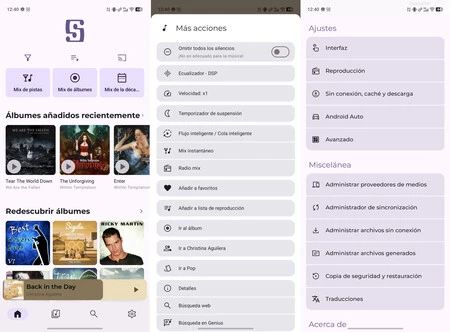
Symfonium on Android
The best thing about the system is that I have the entire music library accessible regardless of the device. What do I review a new phone? I load Symfonium, configure it and have instant access to Spotiván. I can listen to streaming music, download songs to my phone, organize music by lists, the random mode is customizable and it is very easy to use.
The system I have set up perfectly replaces Spotify
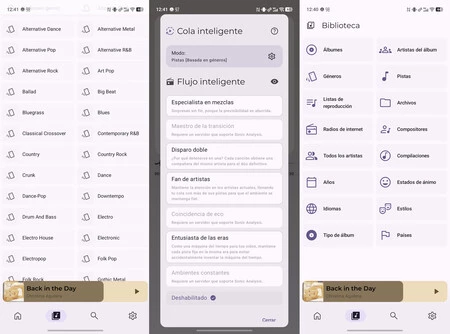
Symfonium on Android
I had my doubts. It took me a while to find the right system. It took me several hours until I got everything ready. Now I can say that I have put together a system that perfectly replaces Spotify with a solution that is 100% under my control. Although I miss things, especially DJ Livi.
Spotify began as a catalog of music accessible instantly by streaming, but has evolved into a music recommendation platform. It’s what he knows how to do best. In my own catalog I miss discoveries and suggestions beyond what I usually hear. Although on Spotify it also falls into the favorites loop.
The AI applied to music recommendations is a Spotify tool that cannot be replicated. For me it is the best thing it has
I open Symfonium and have my favorite songs without downloading them or paying a subscription. The sensation is identical to Spotify: it is as if the music is on your mobile even though it is downloaded via streaming. In my experience, it is worth betting on your own solutions. Especially when the platforms do nothing but increase in price without improving.
Cover image | Ivan Linares
In Xataka Mobile | With RAM becoming priceless, manufacturers have a new trick to highlight: inserting giant batteries

