


A long time ago, before Galaxy AI was an important part of the Galaxy, the Object Eraser It was already there, so that retouching photos by easily and quickly removing objects was a matter of seconds. If you are a regular user of this Galaxy Gallery feature and have recently updated to One UI 8.5, it is very possible that you have already noticed: it is no longer there.
Now you have to activate it
It is not good news, or it would not be good news if it were a permanent elimination. Luckily that is not the case. In reality, Samsung has simply changed its priorities. Now, this feature is still available, but you have to activate it.
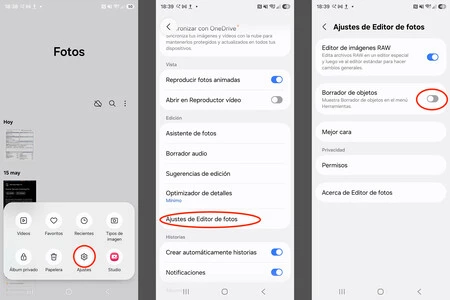
To do this, you must open the Gallery, go to its Menu, at the bottom of the screen, on the right, touch Settingsthen in Photo Editor Settings and there simply mark the switch that activates it. Once you have done so, you will have it where you always have it, as the first option when clicking on Edit any photo in your gallery.
The reason for this change may not seem too obvious to the user, but Behind her is precisely Galaxy AI and its utilities.
Now that Samsung smartphones are so focused on AI, there is a small differentiation that goes unnoticed by most of us: which functions are executed on the device itself and which are performed on the servers dedicated to artificial intelligence.
The Object Eraser is a function designed as something immediate, to serve us quickly; to eliminate that person who has appeared in the background of our photo before sending it on WhatsApp and similar situations. As such, it is designed to run on our device, saving us time above all.
It is designed for quick image adjustments, locally, not to rebuild a background or do complex deletions. For that we have Galaxy AI features, which run on Samsung servers.

As Samsung is currently powering Galaxy AI, the Object Eraser has taken a backseat and That’s why it is disabled by default..
Samsung knows that with AI you can achieve better results in all situations, although in exchange it takes us longer to achieve them and we have to use server resources.
The good thing is that, for anyone who wants to continue using the usual tool, as they have done until now, the function is still thereavailable at any time. You just have to activate it.
Images | Manu García, Samsung
In Xataka Mobile | Samsung wants to put an end to infinite scroll. With this function that is already being tested in One UI 9, you have more chances than ever to achieve it
In Xataka Mobile | The great advantage of updating to One UI 8.5: less advertising on our Galaxy without installing anything

